
 CONVERGE Horizon
Status Definitions#
CONVERGE Horizon displays a status for every cloud resource that users create. The possible status values for each type of resource are described below.
File System Status#
A file system can have any of the statuses listed below.
- Pending:
CONVERGE Horizon is requesting a storage device and a virtual machine (VM) from the cloud provider.
- Provisioning:
CONVERGE Horizon is attaching the storage device to the VM and setting up the file system.
- Online:
The file system is available for use.
- Hibernating:
The file system is hibernating.
- Deleting:
CONVERGE Horizon is deleting the file system.
- Deleted:
The file system has been deleted and the hardware has been released.
Job Status#
A job can have any of the statuses listed below.
- Batched:
The job has been added to a batch. The job will remain at this status until a user starts the batch.
- Pending:
The job has been added to the queue. CONVERGE Horizon is requesting hardware from the cloud provider.
- Provisioning:
CONVERGE Horizon is provisioning nodes allocated by the cloud provider. This includes software installation and configuration.
- Running:
The simulation is running on the provisioned nodes.
- Interactive:
The job is running in Interactive mode.
- Stopping:
CONVERGE Horizon is stopping the job. If the job was run from a space, this is when output files are uploaded to the space. To avoid unnecessary hardware charges, the cluster may be resized to remove excess nodes that are not utilized during the upload process.
- Stopped:
The job has stopped. This either means that CONVERGE ran to completion or that the simulation was stopped with a STOP file.
- Failed:
The job failed.
Exit Reasons#
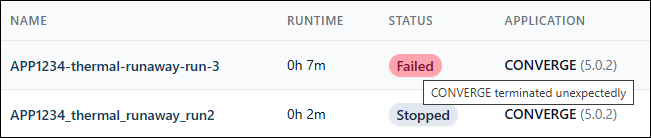
For stopped and failed jobs, you can hover over the status to see the exit reason. Explanations of possible reasons are listed below. For help investigating issues you cannot resolve on your own, request support from our team.
- CONVERGE completed:
CONVERGE ran to completion.
- CONVERGE terminated unexpectedly:
CONVERGE did not run successfully, most likely because of case setup issues. Check the horizon.log file for runtime errors. If you see errors in the log file, adjust your case setup as directed and create a new job.
- User stopped:
A user stopped the job and retained the output files.
- User stopped (data discarded):
A user stopped the job and discarded the output files.
- Batch stopped:
A user stopped the batch to which the job belongs and retained the output files.
- Batch stopped (data discarded):
A user stopped the batch to which the job belongs and discarded the output files.
- Time limit reached:
The job was stopped because the runtime exceeded the specified time limit.
- Maximum queue time reached:
The cloud provider was unable to allocate the required number of nodes within the specified maximum queue time.
- Cluster provisioning failed:
CONVERGE Horizon was unable to provision the cluster.
- Out of disk space:
CONVERGE Horizon stopped the job because the size of the cluster’s scratch storage exceeded the allowed limit. The size of scratch storage is dynamically adjusted to make space for the output files and cannot exceed 10 TB. If a simulation generates enough output data to exceed this limit, CONVERGE Horizon will stop the job.
- Job was stuck:
CONVERGE Horizon stopped the job because it was stuck and the Advanced Options > Stop If Stuck option was enabled.
- Billing limit reached:
CONVERGE Horizon stopped the job because your organization’s balance was equal to or less than a billing limit configured by your organization owner.
Batch Status#
A batch can have any of the statuses listed below.
- Pending:
The batch has been created and you can add jobs to it. None of the jobs will run until you start the batch.
- Running:
The batch has started and jobs are being run according to the batch configuration. You cannot add jobs to a running batch.
- Stopping:
CONVERGE Horizon is stopping the batch. Any jobs in the batch that have not already stopped or failed are being stopped.
- Stopped:
All jobs in the batch have stopped or failed.
Workstation Status#
A workstation can have any of the statuses listed below.
- Pending:
CONVERGE Horizon is requesting a workstation node from the cloud provider.
- Provisioning:
CONVERGE Horizon is provisioning the node allocated by the cloud provider. This includes software installation and configuration.
- Online:
The workstation is ready for use. You can connect to the workstation to run pre- and post-processing applications.
- Deleting:
CONVERGE Horizon is deleting the workstation.
- Deleted:
The workstation has been deleted, either because the time limit was reached or because a user deleted it. The workstation node has been released.
Project Details#
The Project Details page shows the following information about a project:
- Total Jobs:
The total number of jobs created in the project.
- Running Jobs:
The number of jobs in the project that are currently running.
- Total Workstations:
The total number of workstations created in the project.
- Online Workstations:
The number of workstations in the project that are currently online.
- Accrued Cost:
Total accrued cost of all jobs and workstations in the project, including those currently running.
- Node-Hours:
Total node-hours for all* jobs and workstations in the project, including those currently running.
- Completed Jobs:
Percentage of jobs in the project that ran to completion or were stopped with a STOP file. The denominator includes only jobs with a status of Stopped or Failed.
- Created Jobs (Last 30 Days):
The number of jobs created in the project in the last 30 days.
* Does not include node-hours for jobs and workstations created before August 25, 2025.