
 CONVERGE Horizon
Check Job Status
Go to the Jobs page to check the status of a job. You can adjust the filters at the top right to filter the results by job owner, job status, or other criteria. By default, the queue shows only your own jobs from the past week.
The job statuses are defined as shown below. You can see more detailed information about a job’s current status in the job log. If a job is not progressing as expected, visit status.convergecfd.com/status/horizon for real-time information about the status of CONVERGE Horizon and Oracle Cloud Infrastructure (OCI) services.
- Batched:
The job has been added to a batch. The job will remain at this status until a user starts the batch.
- Pending:
The job has been added to the queue. CONVERGE Horizon is requesting hardware from the cloud provider.
- Provisioning:
CONVERGE Horizon is provisioning nodes allocated by the cloud provider. This includes software installation and configuration.
- Running:
The simulation is running on the provisioned nodes.
- Interactive:
The job is running in Interactive mode.
- Stopping:
CONVERGE Horizon is stopping the job. If the job was run from a space, this is when output files are uploaded to the space. To avoid unnecessary hardware charges, the cluster may be resized to remove excess nodes that are not utilized during the upload process.
- Stopped:
The job has stopped. This either means that CONVERGE ran to completion or that the simulation was stopped with a STOP file.
- Failed:
The job failed.
For stopped and failed jobs, you can hover over the status to see the exit reason. Explanations of possible reasons are listed below. For help investigating issues you cannot resolve on your own, request support from our team.
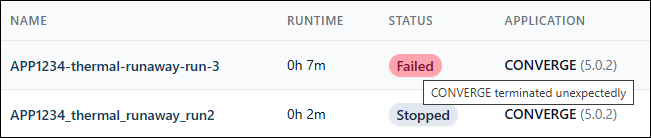
CONVERGE completed: CONVERGE ran to completion.
CONVERGE terminated unexpectedly: CONVERGE did not run successfully, most likely because of case setup issues. Check the horizon.log file for runtime errors. If you see errors in the log file, adjust your case setup as directed and create a new job.
User stopped: A user stopped the job and retained the output files.
User stopped (data discarded): A user stopped the job and discarded the output files.
Batch stopped: A user stopped the batch to which the job belongs and retained the output files.
Batch stopped (data discarded): A user stopped the batch to which the job belongs and discarded the output files.
Time limit reached: The job was stopped because the runtime exceeded the specified time limit.
Maximum queue time reached: The cloud provider was unable to allocate the required number of nodes within the specified maximum queue time.
Cluster provisioning failed: CONVERGE Horizon was unable to provision the cluster.
Out of disk space: CONVERGE Horizon stopped the job because the size of the cluster’s scratch storage exceeded the allowed limit. The size of scratch storage is dynamically adjusted to make space for the output files and cannot exceed 10 TB. If a simulation generates enough output data to exceed this limit, CONVERGE Horizon will stop the job.
Job was stuck: CONVERGE Horizon stopped the job because it was stuck and the Advanced Options > Stop If Stuck option was enabled.
Billing limit reached: CONVERGE Horizon stopped the job because your organization’s balance was equal to or less than a billing limit configured by your organization owner.