
 CONVERGE Horizon
Run Applications on a Workstation
Once you have connected to a workstation, you can open a terminal to run pre- and post-processing applications from the command line. Examples of commonly used commands are shown below.
To access the files needed to complete your work, you can attach resources to the workstation or transfer files to your scratch storage.
# Run CONVERGE Studio
CONVERGE_Studio

# Run Tecplot for CONVERGE
tecplot_for_converge

# Run ParaView
paraview

# Run check_inputs utility
converge -u check_inputs

# Open Firefox browser
firefox
Tip
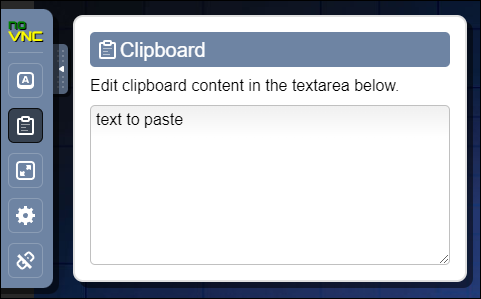
You cannot copy and paste directly between your local machine and the remote workstation. Instead, use the clipboard in the noVNC control panel. Click the gray tab on the left side of the workstation window to show the control panel, and then click  to access the clipboard. You must copy text into the clipboard before pasting it.
Installed Applications
The following applications are installed on each workstation by default:
The bundled CONVERGE installation package, located in
/mnt/fs/.cache/apps. This includes CONVERGE Studio, Tecplot for CONVERGE, and ParaView. Although the bundled installation also includes the CONVERGE solver, it cannot be used to run simulations because the solver cannot check out licenses from the workstation. You can run theconvergeexecutable only to check your input files with the-u check_inputsoption.The CONVERGE Horizon CLI, located at
/usr/bin/horizon.Tools required to compile user-defined functions (UDFs), including CMake and Make.
A handful of other commonly used applications, such as Firefox and gnuplot.
If you need to run an application that is not installed by default, you can install other packages with sudo dnf install. As always, be cautious when exercising sudo privileges. It is possible to lose your work if you remove a package that is required for running the workstation. You must also avoid running applications that bind to ports 22, 80, or 443, as these ports are used by CONVERGE Horizon.